# How to Password Protect a Website or Web SubDirectory With .htaccess & .htpasswd
Working on a website that you need others to see, but not the whole world? Password protecting a website (or a sub directory within a website).
Protecting files on your website from unauthorized users can be very important. You can use PHP or any language to listen for login authorization information on each page, but that doesn’t protect your images, documents, and other media and it is not proper way to do so.
That’s why I’ve found the new method of protecting files and directories the most reliable and is actually a pretty easy thing to do.

To password protect we will use .htaccess and .htpasswd method.
# Step1: Basic Coniguration
To make .htaccess files work as expected, you need to have below line in your site Apache configuration,
> _AllowOverride All_
So your file will look like
> __
>
> _ServerName password-protected.com DocumentRoot /var/www/PasswordProtected # This relaxes Apache security settings. AllowOverride all _
>
> __
This tells Apache that it’s okay to allow .htaccess files to over-ride previous directives. You must reload Apache before this change will have an effect
> _sudo service apache2 reload_
# Step2: Create .htaccess and .htpasswd files
Create a file called .htaccess in the directory that you want to password-protect (in my case I am using /var/www/PasswordProtected directory) with the following content
> _AuthUserFile /var/www/PasswordProtected/.htpasswd AuthName “Authorization Required” AuthType Basic require valid-user_
Then create the file /var/www/PasswordProtected/.htpasswd which contains the users that are allowed to login and their passwords.
We do that with the htpasswd command, to use this command make sure apache2-utils package is install.
> _htpasswd -c /var/www/PasswordProtected/.htpasswd USER1_
The -c flag is used only when you are creating a new file. After the first time, you will omit the -c flag, when you are adding new users to an already-existing password file. Otherwise you will overwrite the file!!
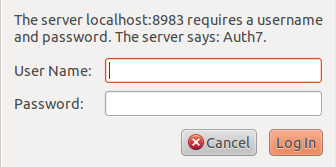
And that’s it you are done !! Your website is password protected now.
 To password protect we will use .htaccess and .htpasswd method.
# Step1: Basic Coniguration
To make .htaccess files work as expected, you need to have below line in your site Apache configuration,
> _AllowOverride All_
So your file will look like
> _
To password protect we will use .htaccess and .htpasswd method.
# Step1: Basic Coniguration
To make .htaccess files work as expected, you need to have below line in your site Apache configuration,
> _AllowOverride All_
So your file will look like
> _